
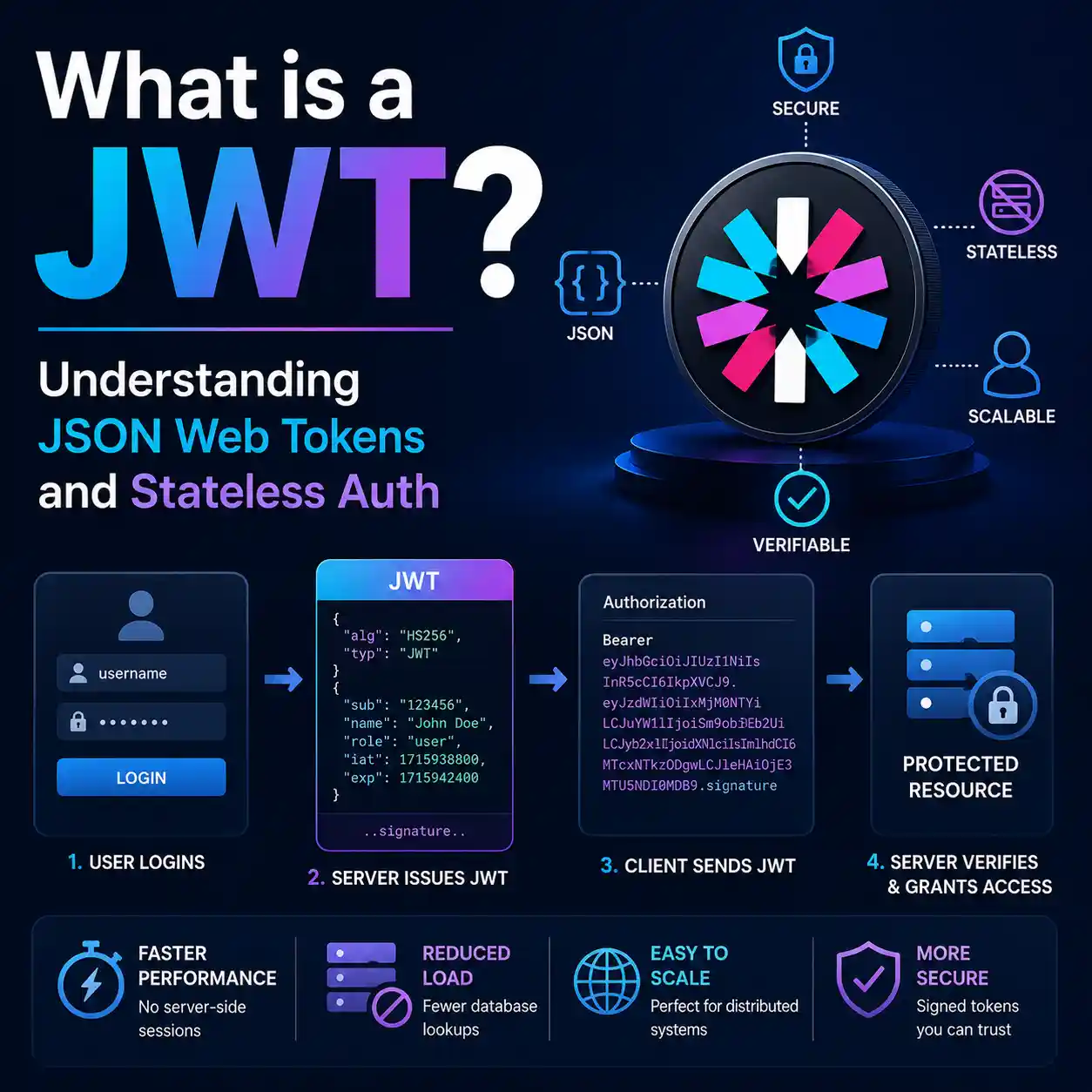
When you log into a modern Single Page Application (like React or Vue) or a mobile app, the server needs a way to remember who you are. Traditionally, it did this by storing a "session ID" in a massive database on the server, and dropping a cookie on your browser. Every time you clicked a button, the server had to look up that ID in its database. This is called stateful authentication.
However, in the era of microservices and cloud scaling, databases became a bottleneck. To solve this, developers adopted Stateless Authentication via JSON Web Tokens (JWT). With JWT, the server doesn't need to remember who you are—your browser tells the server exactly who you are, and uses cryptography to prove it.
The Anatomy of a JWT
If you inspect network traffic after logging into a modern app, you'll likely see an "Authorization: Bearer" header followed by a long, random-looking string of characters separated by two dots. That is a JWT.
A JWT consists of exactly three parts: Header.Payload.Signature.
1. The Header
The first part is a Base64URL encoded JSON object that simply describes the token. It usually contains two properties: the type of token (JWT) and the signing algorithm being used (such as HMAC SHA256 or RSA).
2. The Payload (Claims)
The middle part is also a Base64URL encoded JSON object. This is where the actual data lives. These pieces of data are called "claims". For example, it might contain your User ID, your role (e.g., "Admin"), and an expiration timestamp. Because this payload is attached to every request, the server instantly knows who you are without querying a database.
CRITICAL WARNING: The payload is merely encoded, not encrypted. Anyone who intercepts a JWT can easily decode it and read the payload. Never store passwords, social security numbers, or sensitive data inside a JWT payload.
3. The Signature
If anyone can read and edit the payload, what stops a malicious user from changing their role from "User" to "Admin"? The answer is the Signature.
To create the signature, the server takes the Header, the Payload, and a highly secure Secret Key (known only to the server), and runs them through a cryptographic algorithm (like SHA256). The resulting hash becomes the Signature.
When the server receives a token back from the client, it recalculates the signature using its Secret Key. If the user tampered with the payload (even changing a single letter), the recalculated signature won't match the signature on the token, and the server will instantly reject the request as fraudulent.
Inspect Tokens Safely
Need to read the payload of a JWT to debug your application? Use our offline JWT decoder to inspect the claims instantly without sending your sensitive token to a remote server.
Open JWT DecoderWhy Microservices Love JWTs
Imagine a company like Netflix. They have an Authentication server, a Video Streaming server, and a Billing server. If they used traditional sessions, every single server would have to constantly communicate with a central database to check if a user is logged in.
With JWTs, the Authentication server signs the token using a private key. The user then passes that token directly to the Video server. Because the Video server has the public key, it can independently verify the signature. The Video server knows exactly who the user is without ever talking to the Authentication server or a database. This allows infrastructure to scale infinitely without bottlenecks.
The Dark Side: Token Invalidation
JWTs are not perfect. Their biggest strength (being stateless) is also their biggest weakness. Because the server does not keep a record of active tokens, you cannot easily log a user out or invalidate a specific token before it expires.
If a hacker steals a user's JWT, the hacker has full access until the token's expiration timestamp runs out. To mitigate this risk, security engineers use a two-token system:
- Access Tokens: Short-lived JWTs (e.g., 15 minutes) used for API requests.
- Refresh Tokens: Long-lived, stateful tokens stored securely, used strictly to request new Access Tokens. If an account is compromised, the server revokes the Refresh Token, and the hacker's Access Token will naturally die in 15 minutes.
Frequently Asked Questions (FAQ)
Where should I store a JWT on the frontend?
Storing JWTs in localStorage makes them vulnerable to Cross-Site Scripting (XSS) attacks. The most secure place to store a JWT in a web browser is inside an HttpOnly cookie, which prevents JavaScript from accessing it.
What happens if my server's Secret Key is leaked?
Catastrophe. If a hacker obtains your HMAC secret key or RSA private key, they can generate valid JWTs with any payload they want. They could create tokens giving themselves "Super Admin" privileges and your server would accept them as valid. You must rotate your keys immediately.
Are JWTs faster than session cookies?
Not necessarily. JWTs are significantly larger in file size than a 32-character session ID, meaning they consume more network bandwidth on every request. Their speed advantage comes entirely from bypassing database lookups on the backend.